
Data protection is one of the most important responsibilities for modern businesses. Organisations rely on digital information for almost every aspect of their operations, from financial records and customer information to project documents, communication histories, and operational data.
As data volumes continue to increase, businesses often look for ways to protect information while controlling storage costs. Two strategies frequently discussed in this context are file archiving and backup.
Although these terms are sometimes used interchangeably, they solve very different problems.
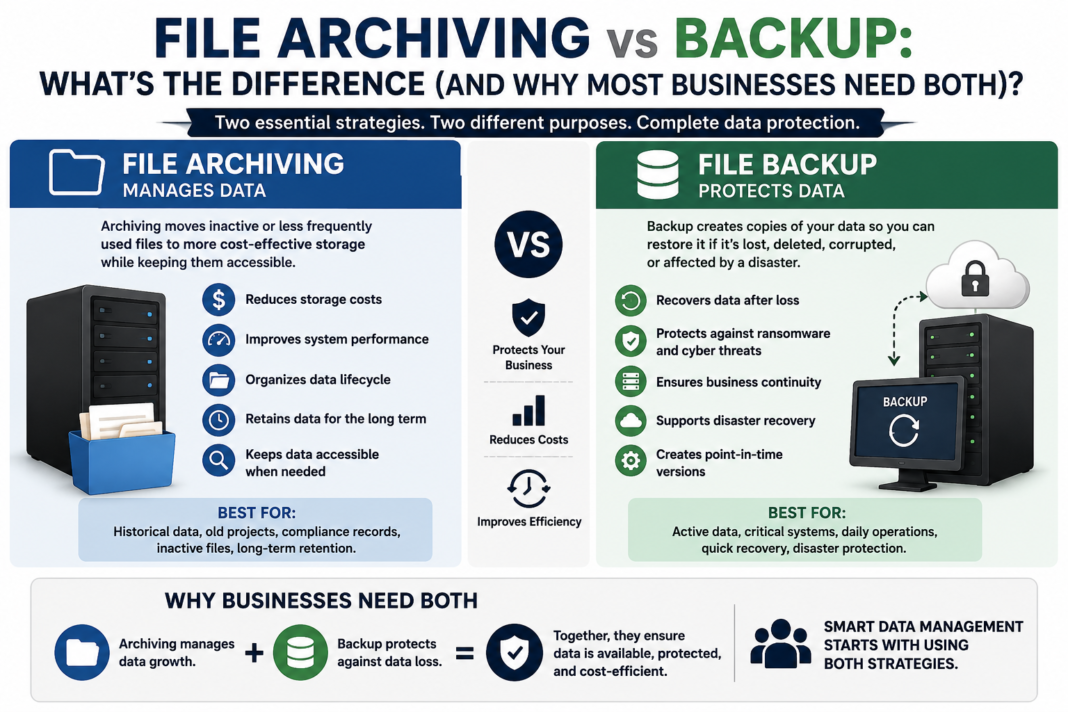
A backup is designed to help organisations recover data after unexpected events such as accidental deletion, hardware failure, cyberattacks, or system outages. File archiving, on the other hand, focuses on managing data throughout its lifecycle by moving older or less frequently accessed information away from primary storage while keeping it available when needed.
Understanding the difference between these approaches is essential. Many organisations discover that relying only on backups does not solve their storage growth problems, while relying only on archives does not provide adequate protection against data loss.
For most businesses, the most effective strategy involves using both.
What Is File Backup?
A backup is a copy of data created specifically for recovery purposes.
The primary goal of backup is to restore information after something goes wrong. If files are accidentally deleted, corrupted, encrypted by ransomware, or lost because of hardware failure, a backup provides a way to recover them.
Backups typically focus on:
- Data protection
- Disaster recovery
- Business continuity
- System restoration
Common examples include:
- Daily backups of company file servers
- Virtual machine backups
- Database backups
- Cloud application backups
- Full system backups
A backup usually creates additional copies of existing data. These copies are stored separately so they can be restored when required.
For example, if an employee accidentally deletes an important project folder, an administrator can restore the missing files from a previous backup version.
What Is File Archiving?
File archiving is a strategy for managing information that is no longer actively used but still needs to be retained.
Instead of keeping years of inactive files on expensive primary storage, organisations can move older data to a different storage location while maintaining access to it.
The goal of archiving is not primarily recovery. It is long-term information management.
File archiving helps organisations:
- Reduce pressure on primary storage
- Improve file server performance
- Maintain access to historical information
- Support retention requirements
- Control long-term storage costs
Examples of files that are often suitable for archiving include:
- Completed project documents
- Historical reports
- Old customer records
- Previous versions of files
- Departmental documents that are rarely accessed
Unlike backups, archives are designed to remain useful over long periods rather than simply acting as recovery copies.
The Key Difference: Backup Protects Data, Archiving Manages Data
The easiest way to understand the difference is to consider the purpose behind each approach.
Backup Answers:
“How do we recover our data if something goes wrong?”
Backup protects against:
- Accidental deletion
- Hardware failure
- Cybersecurity incidents
- System corruption
- Unexpected outages
Archiving Answers:
“How do we manage information that we still need but rarely use?”
Archiving helps with:
- Storage growth
- Data organisation
- Retention management
- Reducing primary storage usage
- Long-term accessibility
Although both involve storing copies of information, their objectives are different.
Why Backup Alone Is Not Enough
Many organisations assume that having a strong backup system solves all their storage challenges.
However, backups do not reduce the amount of data stored on primary systems.
A company may have a file server containing 20TB of documents. A backup system might create multiple backup copies of that data, but the original 20TB remains unchanged.
Over time, businesses often experience:
- Increasing file server storage requirements
- Longer backup windows
- Higher backup storage costs
- More complex recovery processes
Backup protects data, but it does not address the problem of unnecessary data accumulation.
For example, a company may have ten years of old project folders stored on a file server. Those files might only be accessed once or twice a year, but they continue consuming primary storage capacity.
Archiving provides a way to manage this type of information more effectively.
Why Archiving Alone Is Not Enough
While archiving helps reduce storage pressure, it is not a replacement for backups.
Archived files still need protection.
A common mistake is assuming that moving data into an archive means it no longer requires backup or security controls.
Archived information can still be affected by:
- Hardware failure
- Accidental deletion
- Cybersecurity threats
- Storage corruption
- Access control issues
A comprehensive data strategy should ensure that archived information is protected according to its importance.
How Backup and Archiving Work Together
The strongest approach combines both methods.
A typical business data lifecycle may look like this:
Stage 1: Active Data
New and frequently used files remain on primary storage.
Examples:
- Current projects
- Active documents
- Frequently accessed records
These files are usually included in regular backups.
Stage 2: Inactive Data
As files become older and less frequently accessed, they can be moved to archive storage.
Examples:
- Completed projects
- Historical documents
- Older reports
The files remain available but no longer consume valuable primary storage capacity.
Stage 3: Long-Term Retention
Some information may need to be retained for many years due to regulatory, legal, or business requirements.
This data can be managed through long-term archive policies while still being protected appropriately.
This combination creates a more efficient approach where active storage, archive storage, and backup systems each perform the role they are best suited for.
The Impact of Data Growth on Businesses
Uncontrolled data growth affects organisations in several ways.
Increased Storage Costs
Keeping all data on high-performance storage is expensive.
Primary storage is designed for speed and availability, but older data often does not require the same performance levels.
Longer Backup Times
As file servers grow, backups take longer to complete.
This can create problems such as:
- Longer backup windows
- Increased network traffic
- Slower recovery processes
More Difficult Data Management
Large volumes of unmanaged data make it harder to:
- Find important information
- Apply retention policies
- Meet compliance requirements
- Identify outdated files
Effective archiving reduces these challenges by ensuring that data is stored according to its importance and usage.
Common Misunderstandings About File Archiving
“Archived Files Are Deleted”
This is one of the biggest misconceptions.
A properly designed archive does not simply remove files. Instead, it moves information to a different storage location while maintaining access according to organisational requirements.
“Backup and Archive Are the Same Thing”
Although both involve storing data, their purposes are different.
Backup is about recovery.
Archive is about lifecycle management.
“All Data Should Stay on Primary Storage”
Not every file requires immediate access at maximum performance.
Keeping inactive data on primary storage can create unnecessary costs and reduce efficiency.
Choosing the Right Approach for Your Organisation
Every organisation will have different requirements, but several factors should influence data management decisions.
Consider Data Access Patterns
Ask:
- Which files are accessed regularly?
- Which files have not been opened for years?
- Which information needs immediate availability?
Understand Retention Requirements
Some information must be retained for:
- Legal reasons
- Industry regulations
- Historical reference
- Business operations
Retention policies should guide how information is stored.
Review Storage Infrastructure
Consider:
- Current storage capacity
- Growth rate
- Backup performance
- Available archive locations
- Future business requirements
The Role of Modern Archiving Tools
Modern file archiving platforms help organisations automate the process of identifying and managing inactive data.
Rather than relying on manual reviews, these tools can apply policies based on factors such as:
- File age
- Last access date
- File type
- Department requirements
- Retention rules
Solutions in this space, including tools developed by companies such as MLtek Limited, demonstrate how organisations are increasingly focusing on intelligent storage management rather than simply adding more capacity.
For example, ArchiverFS is designed around the concept of managing inactive files while allowing users to continue accessing archived information through familiar workflows.
The wider trend across the industry is moving towards smarter data lifecycle management, where businesses actively decide where information should live instead of allowing storage requirements to grow without control.
Best Practices for Combining Backup and Archiving
To create an effective strategy, organisations should consider the following practices:
Define Clear Policies
Establish rules for:
- When files should be archived
- How long data should be retained
- Which data requires backup protection
Review Data Regularly
Storage requirements change over time. Regular reviews help identify new opportunities for optimisation.
Protect Archived Data
Archived information should still have:
- Appropriate security controls
- Access management
- Backup or recovery options where required
Avoid Treating All Data Equally
Different types of information have different requirements.
A frequently edited document and a ten-year-old project folder should not necessarily use the same storage resources.
Conclusion: Backup and Archiving Solve Different Problems
Backup and file archiving are often discussed together, but they serve different purposes.
Backup protects organisations when data is lost, damaged, or compromised. Archiving helps businesses manage the growing volume of information they create over time.
Using one without the other can leave important gaps. Backup alone may result in unnecessary storage growth, while archiving alone does not provide complete protection against data loss.
By combining both approaches, organisations can create a balanced data management strategy that improves efficiency, reduces storage pressure, and ensures important information remains available when needed.
The goal is not simply to store more data. It is to manage information intelligently throughout its entire lifecycle.
Apart from that if you want to know about What is Unicode Support in File Archiving? then please visit our Tech Category.